Family Court Records in Greenville County can be accessed quickly through the official online portal, letting you locate divorce filings, child custody orders, and adoption petitions without leaving home. By entering a case number or party name, the Greenville County family court records search returns docket entries, hearing logs, and certified copies, helping you verify judgments or retrieve sealed documents when permitted. This streamlined lookup meets the needs of attorneys, guardians, and citizens seeking reliable public family law information.
Family Court Records also support detailed inquiries such as paternity filings, name‑change orders, and protective‑order requests, all searchable via the Greenville County family court case lookup tool. Whether you need a copy of a final judgment, a motion status update, or a recent filing date, the system connects you to the Greenville County family court clerk’s office for official copies and fee details. Quick, transparent access reduces delays and clarifies case outcomes for every user.
How to Search Family Court Records
Family Court Records in Greenville County can be searched through the official public index by case number or party name. A matched entry can show the case style, court, filing date, docket activity, hearing dates, and the status displayed for the case. You can also access court calendar to review official records. Use the listing to confirm which file exists, then ask the clerk for a copy of any document you need. An index entry and a certified paper copy serve different purposes, so complete both steps.
Official Search Portal: https://www2.greenvillecounty.org/scjd/publicindex/
Steps to Search
- Open the official public index and locate the court or case-type menu for Family Court in Greenville County, South Carolina.
- Choose the search method that matches your records. Use a case number for the most direct match, or select a name search when you know the full legal name of a party.
- Enter the case number exactly as it appears on a summons, petition, hearing notice, or order. Remove spaces only if the portal’s search box requires that format.
- For a name search, enter the party’s legal name and check every result. One person may have several cases involving different courts, case types, or other parties.
- Apply a filing-date or court filter only if the portal provides one. A narrow date range can help when you know when the case began but not the case number.
- Open the matching case and compare the full party names, court, filing date, and case number. Each detail helps rule out a similar case with a different docket.
- Review the docket entries for motions, hearings, orders, judgments, and later activity. Record the exact date and description of the event you need.
- Contact the Greenville County family court clerk for a document copy or certified copy. Do not treat a public-index listing as proof that a complete, certified paper copy is available online.
Save the case number, matching party names, filing date, and document description before requesting a copy. This set of facts lets the clerk locate the right file more quickly and reduces the chance of receiving a record from a related case.
Case Types, Petitions and Judgments
Greenville County family court cases begin with different forms, such as a petition, application, complaint, or motion. Each case receives a case number that links its filings, hearing entries, orders, and later motions. The title shown on the index should match the legal case style, but a short docket label may not describe the full order or its legal effect.
Divorce, Custody, Support and Adoption Filings
A divorce or dissolution case can contain a complaint, financial statements, service records, property documents, hearing notices, and requests for property division, equitable distribution, or spousal support. A later decree or entered judgment records the court’s ruling on those requests. The docket may show only “judgment” or “decree,” so request the signed document before relying on a short event description.
- Custody and parenting-time records may include a petition, temporary orders, a parenting plan, hearing entries, and a final custody or parenting-time order.
- Child support filings can include a petition or initiating document, financial forms, motions to change the amount, and hearing records.
- Support orders can set the amount, payment terms, and review terms stated in the order. A support case and a payment account may use separate records.
- Adoption filings can include a petition, consent documents, a home study record, hearing notices, and an adoption decree.
The index often shows the case number and event title without reproducing every attachment. Financial forms, service documents, and adoption records may require separate handling because of privacy rules or court restrictions.
How Main Case Types Appear in a Family Court File
The table below lists common filing types and the records often sought in each matter. It serves as a search aid rather than a complete list of forms or orders used by the court.
Paternity, Name Change and Protective Orders
Paternity records may contain a petition, an acknowledgment of parentage, service entries, hearing dates, and an order establishing legal parentage. A name-change case can include a petition, published notice when required by law, hearing entries, and the order granting the change. Search under every legal name connected to the case, including a prior name, when that name appears on a court document.
Family Court may handle certain protective-order matters connected with a family case. A separate domestic-violence order can belong to a magistrate or criminal court system, based on the court named on the order. The issuing court named on the document is the best starting point for locating that particular record.
- Check whether the docket uses initials, a case title, or another legal caption.
- Compare the case number on the order with the number returned by the public index.
- Ask the clerk which court holds a protective-order file if the order came from a different court.
- Request the signed order rather than relying only on a docket label such as “protective order filed.”
Motions, Court Orders and Hearing Logs
A family court docket records events in the case as they occur. A motion asks the court to decide a new issue, such as a change to support, custody, parenting time, or a prior decree. The clerk records the motion and any hearing connected with it, but the motion itself does not grant the requested relief.
- A petition or application starts the case and asks for the court’s first decision.
- The clerk records filings, service, notices, and hearing dates as they enter the file.
- A hearing record may show who appeared, the date, and a short subject or result.
- A judge signs an order or judgment after deciding the request.
- The clerk places the signed order into the case file, where it can be requested as a copy.
A hearing log usually answers when and where a hearing occurred. It may not state every term of the ruling, and it may not show the full text of an order. For a custody schedule, support amount, property division, or other exact term, obtain the signed order or decree.
Case Status, Entered Judgments and Modified Orders
Case status gives a quick view of the docket’s most recent state. A status label can change after a new filing, hearing, service event, entered judgment, or closing order. It does not replace the docket history, and it does not show whether every term has been carried out.
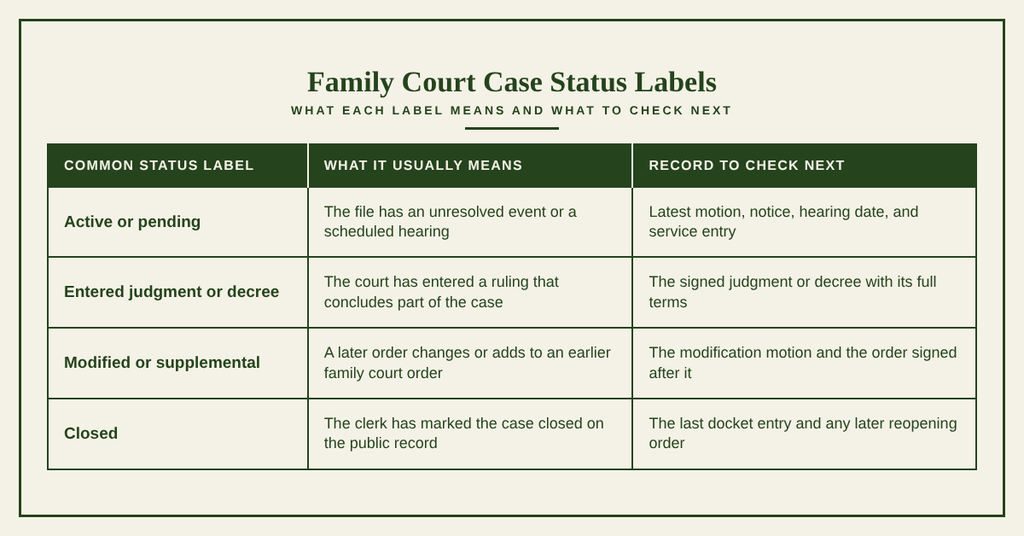
A motion to modify support, custody, or parenting time does not change an earlier order by itself. The later signed order controls the new term from the date stated in that document. Request both the original order and the modification order when you need to trace the full case history.
Public Availability and Official Copies
The public index and the paper case file are related, but they are not interchangeable. The index can help locate a case and summarize docket activity. The clerk can provide a copy of a filed document and explain whether that copy can be certified. Public viewing rules vary by record, so a family case may appear in the index even when some documents remain hidden.
Greenville County Family Court Clerk and Search Sources
The Greenville County family court clerk is the official source for case-file copies and clerk certifications. The South Carolina Judicial Department public index is the official online search outlet for locating cases. Use the index to identify the case, then contact the clerk to confirm the document title, copy type, fee, and delivery method.
Keep a record of the source used for each fact. A docket entry can support the claim that a motion was filed, but only the filed motion shows the request itself. An entered judgment supports the claim that a ruling was made, while the signed judgment provides the operative terms.
Restricted Minor, Financial and Sealed Data
Public availability does not mean every document in a family case can be viewed by anyone. Sealed records are kept from public viewing by a court order. Other records may have identifying details removed, especially records involving children, juveniles, adoption, paternity, protective orders, or private financial material.
- A sealed case or document may return no public image or only a case-level listing.
- Minor identifying details can be limited or removed to protect a child’s privacy.
- Juvenile case material can be protected under state law and court policy.
- Some financial forms and supporting papers may have private details withheld from public copies.
- Adoption, paternity, and certain protective-order records can carry different privacy limits from ordinary divorce filings.
A missing result does not prove that no case exists. The clerk can check whether a file is sealed, placed under another legal caption, held under restricted handling, or still waiting for indexing. A public request cannot remove a court seal; a person seeking an unsealed record may need to ask the court for an order.
Online, Mail and In-Person Copy Requests
The best request method depends on the document, urgency, delivery choice, and current clerk-office rules. Search and document ordering are separate functions. Use the public index to gather case facts, then follow the clerk’s process for obtaining the actual copy.
Online Copy Request
The public index handles case lookup. If the page presents a document-order or copy-request option, use the case number and document choices shown there for Greenville County Family Court. Individuals can also check traffic ticket records to verify relevant details. If no order option appears, contact the clerk rather than sending payment through an unverified form. Treat a downloaded image as a reference copy unless the page expressly states that the clerk has certified it.
Mail Copy Request
Ask the clerk whether the office accepts mailed requests for the type of copy you need and which payment method it accepts. A complete request can list the case number, full party names, document title, relevant date, ordinary-copy or certified-copy status, and contact details. Include identification only as directed by the clerk, and use the mailing address in the contact section below after confirming the correct office and mail procedure.
In-Person Copy Request
Visit during the posted office hours listed at the end of this page. Bring the case number, party names, document title or date, a government-issued photo ID, and the confirmed fee payment. The clerk can check the file, explain any restriction, and confirm whether pickup is available for the requested record.
Certified Copies, Fees and Processing Times
A certified copy carries the clerk’s confirmation that it is a true copy of the record kept by the court. Certification is useful when an agency, employer, court, or other office asks for an official case record. The clerk decides which documents may be certified and which fees apply.
- Identify the exact document from its docket description, title, and date.
- Ask whether you need an ordinary copy, a certified copy, or both.
- Give the clerk the case number and matching party names so the file can be checked.
- Confirm identification, fees, payment methods, delivery options, and the expected ready date.
- Compare the received copy with the document title and date before using it.
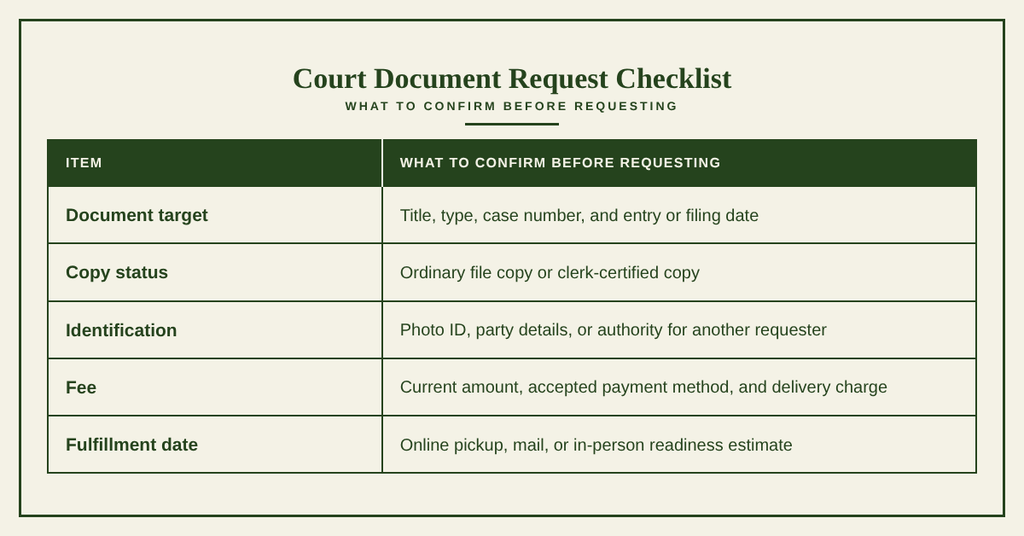
Fees are set by the applicable court fee schedule and can depend on page count, certification, delivery, or postage. Ask for the current total before sending payment. Do not assume that a free public-index result includes a free document or certified copy.
No single processing period covers every request. A recent filing may need indexing, a large file may take longer to copy, and payment or identification issues can pause processing. Ask the clerk for a ready date based on the request method and workload, then check the status before making travel plans.
How Family Court Records Differ from Other Record Sources
Different court offices and agencies keep records for different legal purposes. The label on a document does not always reveal which office holds the full record. Comparing the issuing court, case number, and document type prevents a search of the wrong system.
A child support order can sit in Family Court while a separate agency case tracks collection activity. A domestic-violence protective order can sit in a magistrate court even when the dispute involves family issues. For vital records, request a certificate from the vital records office rather than searching a family court docket.
Record Accuracy and Missing Results
A search result can be wrong, incomplete, or absent for several reasons. Case numbers give the strongest link to one file, while names and dates need careful comparison. A careful search records each attempt and gives the clerk enough facts to continue the search without guessing.
Matching Party Names and Case Numbers
Start with the case number whenever a court notice, petition, summons, or order supplies one. Confirm that the county, court, and case type match the record you expect. If the number produces no result, check for a typed or handwritten digit and compare the complete number rather than a shortened version.
- Enter the full case number without changing its format.
- Open the result and compare every party name shown.
- Match the filing year and court shown in the docket.
- Compare the filing date with the date on your paper.
- Review the latest docket entry for a later judgment, transfer, or modification.
- Use the legal name on the court filing, including initials or suffixes shown by the court.
- Check former legal names when a petition used a prior name.
- Confirm whether the person appears as a petitioner, plaintiff, respondent, defendant, or another listed party.
- Expect more than one result for a person involved in several cases.
- Check nearby filing dates and related court names before selecting a match.
If a listing shows a wrong name, date, event, or status, save the result and compare it with the filed paper. Ask the clerk to review the conflict and determine which record controls. The signed order or decree should receive priority over a shortened or outdated index label.
System Delays for Recent Filings
A newly filed case or document may not appear in the public index at once. The clerk’s office and the statewide public index are separate parts of the record process, so a new docket event can precede the online view. This timing issue can affect cases filed near the end of a business day as well as documents that still need clerk processing.
- The case may be filed but not yet added to the public index.
- A paper document may need to be scanned before its image appears.
- A clerk may need to complete a quality check before release.
- A hearing date may appear before the related written order is available.
- A legal-name change or different case caption can affect a name search.
Search once with the case number, then contact the clerk if the filing date is recent and the record remains absent. Give the clerk the paper’s case number, filing date, party names, and document title. The clerk can check the court’s internal filing data and explain whether the online index is current.
Unlisted Family Court File Resolution
An unlisted family court file may exist even when the public search returns no match. The clerk’s office can check records that have not reached the index, records with restricted handling, and files filed under another legal caption. A search of the wrong court or an outdated name can also create the same visible result.
- Confirm that the document names Greenville County Family Court and list the correct county.
- Copy the complete case number from the source document and check every digit.
- Search by the current legal name, prior legal name, and initials shown on the filing.
- Try the responsible party’s name in the party-search field rather than the other party’s name.
- Call the clerk with the filing date, hearing date, case type, and names of the parties.
- Ask the clerk to check the court’s underlying index for a recently filed or unlisted case.
- Confirm whether the file is sealed, restricted, stored under another caption, or assigned to another court.
- If the clerk identifies another court or agency, request the record from that source using its case number.
Keep a written log of each name and number you searched. If the clerk cannot locate a file, describe the documents you hold and ask which office may have received the filing. Do not infer that a case was never filed merely because the public index has no match.
Record verification ends with a source comparison. Match the clerk’s copy against the case caption, document date, judge’s name, and requested terms. If pages conflict with the public listing, retain both records and ask the clerk which paper belongs in the official file.
Family Court Record Request Checklist
A clear request helps the clerk locate the right file without extra calls. Gather the case facts before asking about fees, certification, delivery, or collection. Missing details often cause a request to pause, particularly when a case number is absent or several parties have similar names.
Ask the clerk to confirm the document title, copy status, total charge, and ready date before payment. Keep the clerk’s written response with your case notes, especially when a request needs a later hearing, additional identification, or special handling.
A court record can confirm that a case, hearing, motion, or order was filed. It does not by itself decide whether a legal deadline passed, whether a party complied with an order, or whether a court entered a later ruling. A family law attorney can review those legal questions using the complete file.
Contact Information
Use the following details for questions about public filings, document copies, certified copies, fees, and case-file status.
- Clerk’s office: 305 East North Street, Greenville, SC 29601
- Phone: (864) 467-8551
- Office hours: Monday through Friday, 8:30 AM to 5:00 PM
The office can confirm the correct record source, restricted handling needs, identification rules, payment methods, and current processing time before you place a request.
Frequently Asked Questions
Find quick answers about accessing Greenville County family court records, searching online, and obtaining copies of filings or orders.
How can I search Greenville family court records online?
Visit the official public index at https://www2.greenvillecounty.org/scjd/publicindex/. Choose the family court tab, then enter either the case number or a party’s name. The system returns matching entries showing the case style, filing date, docket activity, hearing dates, and current status. Review the list to confirm the record you need, then note the case number for any follow‑up requests at the clerk’s office.
What info appears in a Greenville case index entry?
An index entry displays the case style (names of the parties), the court that handled the matter, the filing date, and a brief docket summary. It also lists upcoming or past hearing dates, the case’s current disposition, and a unique case number. This snapshot helps you verify that the record exists before requesting a full document from the clerk.
How do I request a certified copy of a court order?
First, locate the case number using the online index. Bring a photo ID to the Greenville County family court clerk’s office at 305 East North Street. Fill out the record request form, specify the order you need, and indicate that you want a certified copy. Pay the required fee, and the clerk will prepare the document. Certified copies carry the clerk’s seal and are accepted for legal purposes.
What fees apply for Greenville court record copies?
The clerk charges a standard fee for each certified copy, plus a smaller charge for plain paper copies. Fees vary by document type; for example, a certified order may cost more than a simple docket entry. Payment can be made by cash, check, or credit card at the clerk’s desk during business hours. The exact amount is listed on the request form and confirmed before you complete the transaction.
How long does it take to receive a requested record?
Processing time depends on the document’s complexity and the clerk’s current workload. Simple docket entries are often ready within the same business day. Certified copies of orders or judgments may require one to two business days. If you need the record urgently, ask the clerk about same‑day service; an extra fee may apply for expedited handling.